
File Uploads
The three available file-handling modes, and how Required applies to file fields.
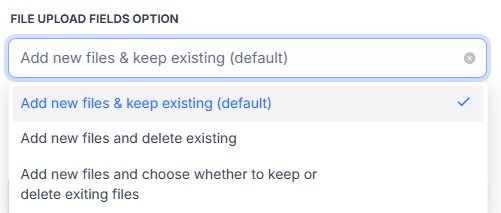
Add New Files
New uploads are added while existing files remain. Use this when users should be able to add supporting documents without removing existing files.
Replace Existing Files
When replacement files are uploaded, existing files are deleted and replaced.
Optional Deletion
The form user can choose whether existing files should be deleted. This is useful where the user needs explicit control over file removal.
Required File Fields
An existing file satisfies a required file field.
Upload Progress
After Save Changes is selected, the form is replaced with an “Updating details” screen so nothing stays editable mid-submit. Once the record itself has saved and any files or a signature are actually uploading, that screen shows a progress bar (Uploading file X of Y); a submission with nothing to upload shows a simple spinner instead.