
Turn any CRM record into a secure, pre-filled update form.
Send customers, staff, contractors or partners a focused form for the exact Contact, Opportunity, Business or Custom Object you need them to review. Current values are already there, CRM access is not required, and changes return to the same record.
US$15/month after trial. Agency and business-account installation supported.
Hi Alex, please review the installation details below and update anything that has changed.
Illustrative mockup of a pre-filled record update form
Let anyone update the right HighLevel record, without giving them CRM access
Customers, contractors, partners and staff can review or update the fields you expose while the CRM stays private.
Stop treating every form submission as a new record
Ordinary forms are great for collecting new information – but your workflow often already knows exactly which existing record needs to be reviewed. That matters most when one Contact has several Opportunities or related records, and a generic form has no way to tell them apart.
No temporary Contact fields
No searching for the right Opportunity after submission
No duplicate external form schema to maintain
No CRM access for the recipient
10 fields or 100. Pre-fill them automatically.
It doesn't matter whether the Object has five fields or five hundred. Update Records with Forms loads the Object's current form fields and current record values automatically when the form opens – there's no long pre-fill URL to build, and no field-by-field mapping to maintain.
Whether your record has a handful of fields or a very large number…
…the form loads the current fields and existing values automatically. You never build or maintain a long URL with every field mapped individually.
Your field order follows your CRM.
Fields are automatically presented using HighLevel's current field positions – not manually re-ordered in a second form builder. Reorder fields in HighLevel and the form can reflect it on the next reload.
Change HighLevel, not two different form systems
A conventional pre-filled form often needs a long URL or field mapping covering every field. Add a field in HighLevel, and somebody has to remember to update that mapping too – or the integration quietly falls behind. Update Records with Forms reads the current Object schema each time the form opens or reloads, so a new field can appear on the same existing link after a short refresh, typically around two minutes, and a reload. Fields configured as Hidden stay hidden, and field types the product can't safely display are omitted rather than guessed.
Five steps from workflow to updated record
Choose the object
Contact, Business, Opportunity or any HighLevel Custom Object.
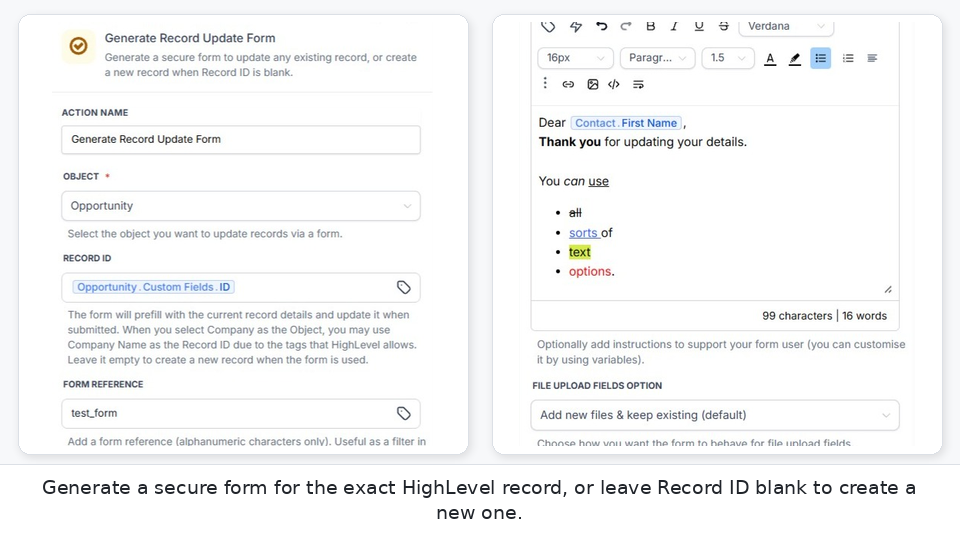
Pass the Record ID
The workflow identifies the exact record. The ID stays behind the scenes.
Control the form
Choose Hidden, Read-only and Required fields. Add personalised rich-text Form Instructions.
Send the secure link
Use form_url in email, SMS, WhatsApp or another workflow step.
Save back to the same record
The recipient reviews current information and only changed values are written back.
Update the exact record
Contact alone often isn't enough. One Contact can have several Opportunities, and only one of them is the job, project or transaction you actually mean. Your workflow supplies the real Record ID before the form is ever sent – the recipient never needs to see or understand it.
Ask people to review, not re-enter
Whenever the form is opened or reloaded, current record values are retrieved from HighLevel and every current field is already filled in – the person only needs to confirm or correct it. It's not another drag-and-drop form builder to maintain separately; HighLevel stays the source of truth.
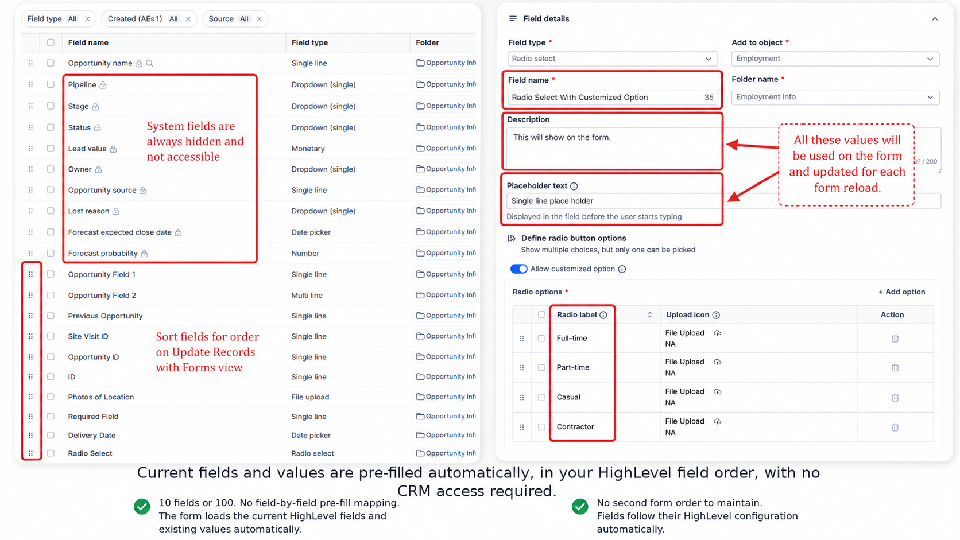
Choose what people can see, change and complete
Hidden or Selected Fields
Hide the fields you do not want, or turn it round and select the only ones the form should show.
Read-only Fields
Show the current value but prevent editing.
Required Fields
Require a valid value before submission. Existing populated values already satisfy Required.
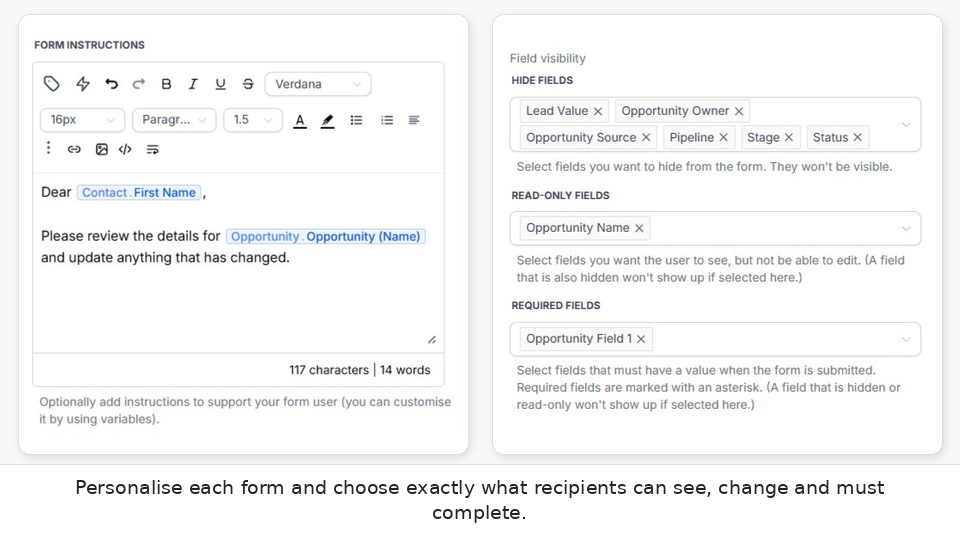
Prove it's them before the form even opens
Turn on Send Verification Code for a Contact or Opportunity form and the recipient has to enter a one-time code sent to the phone or email already on their record before the form loads – not just anyone who gets hold of the link.
Request on one device, verify on any device.
The code can be requested on a desktop and entered after arriving by SMS on a phone – there's no single link tied to one device.
The form looks like you, right down to the address bar
Add your logo and favicon to the form, and point the links themselves at a domain you own. Each sub-account can run its own branded domain, so the recipient opens a link from a business they recognise.
Set it up once per sub-account
Add the domain in the dashboard Settings. You get the exact DNS records to create, with a check that confirms when they have propagated and the certificate is ready.
Existing links keep working
Replacing a verified domain does not break links already in the wild. New links use the current domain, while forms already sent stay reachable on the previous one for a grace period.
Tell each person exactly what you need
Form Instructions support rich text and HighLevel workflow variables, so every recipient sees guidance written for their situation.
"Hi {{contact.first_name}}, please review the installation details below and update anything that has changed."
Forms can also display a logo and per-form browser-tab favicon.
Only update what changed
Changed fields only
If twenty fields are displayed and the recipient changes two, only those changed fields are written back. Unchanged fields are left alone.
Conflicting fields are caught, in place
If a field the recipient is changing was also updated in HighLevel since the form was opened, that field is highlighted with the current value and what they'd entered — no reload, and nothing else on the form is lost. Fields nobody touched are never affected, even if they changed elsewhere on the same record.
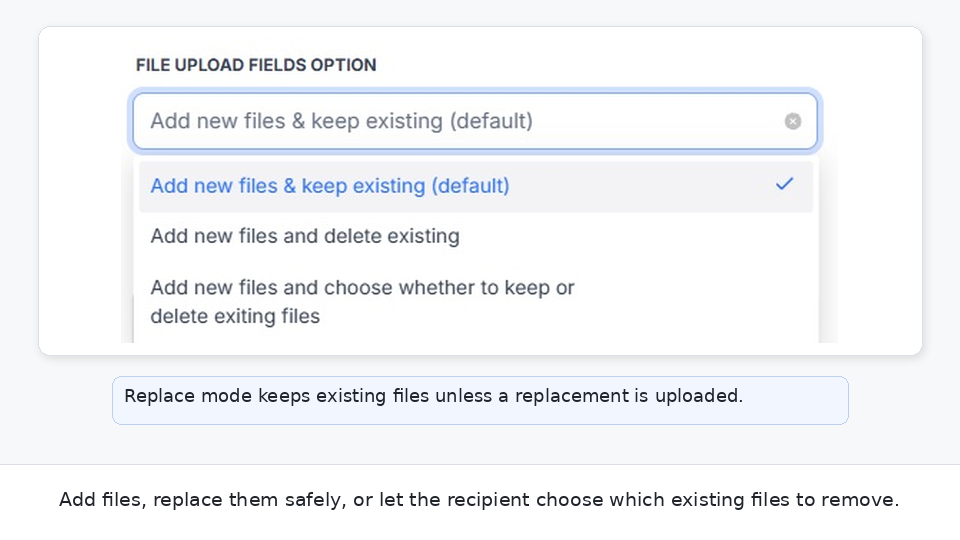
Handle documents without losing the existing file set
Add
Add new files while keeping existing files.
Replace
Replace existing files only when replacement files are actually uploaded. If nothing is uploaded, existing files remain.
Optional deletion
Let the recipient choose which existing files to remove while also adding new files.
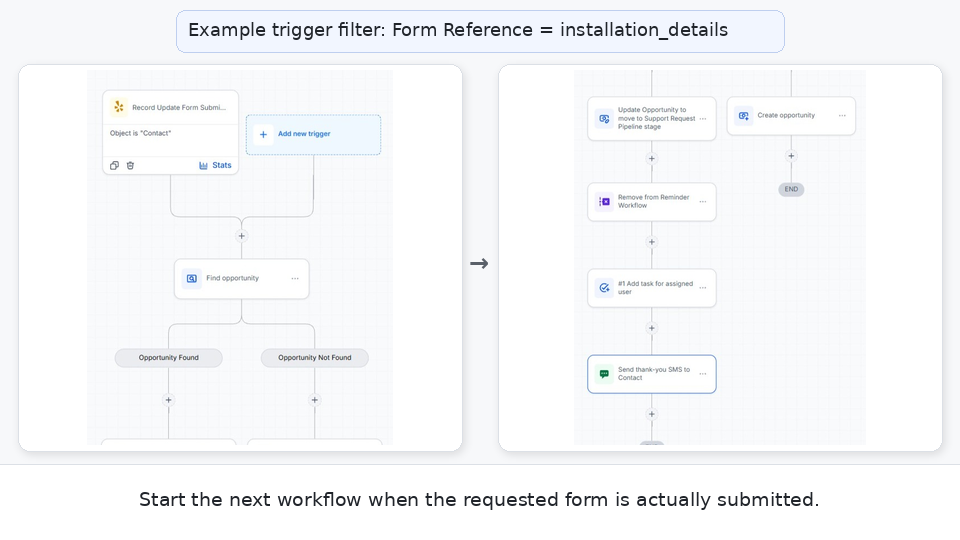
Keep the workflow moving after the human step
The Workflow Action returns useful values you can pass along:
form_url | Send the form |
expires_at | Schedule reminders |
form_reference | Identify the business purpose |
form_id, record_id, object_key | Track and route the submission |
Use Record Update Form Submitted to continue automation after a successful submission. A successful review with no field changes can still trigger the submitted workflow.
A Redirect on Submission can hand the recipient straight to another URL the moment they submit – a confirmation page, a payment page, or another generated form – without waiting on a workflow round trip. See Redirects and Form Chaining →
No record yet? Create it from the same form
Leave Record ID blank. The first successful submission creates a Contact, Business, Opportunity or any HighLevel Custom Object, and the new Record ID becomes bound to the form. If multiple submissions are enabled, later submissions update that same newly created record.
Change a link after it has already gone out
A link sent last week is not set in stone. The Forms dashboard opens inside HighLevel, with a tab for each object, so you can find the links you care about and change them without re-running a workflow or sending a replacement URL.
End or restore access
Retire an active link when access should stop early. Reactivate a retired or expired link for another 30 days when someone needs a second chance at the same URL.
Edit one link or hundreds
Filter and select, then update expiry, Hidden, Read-only and Required fields, file behaviour, redirect, Opportunity pipeline and stage, and Form Instructions in a single pass.
See the change before it lands
Current settings sit beside the proposed change so you can check exactly what will differ, then confirm. Links update one at a time, so a problem with one does not undo the rest.
Built for real HighLevel workflows
One simple plan. Unlimited forms.
14-day free trial
Unlimited Contacts, Businesses, Opportunities and Custom Objects. Unlimited generated forms and submissions. No per-form, per-submission, per-field or per-Object charges.
Start 14-day free trialCommon questions
HighLevel Workflow Implementation Session
Bring your workflow scenario. We'll look at the records and data involved, work out the best form setup, and help you implement it in HighLevel.
Give the right person a safe way to update the right record
US$15/month after trial
Start 14-day free trial